How do I move my site off Wix to something faster without losing rankings?
Moving off Wix without losing rankings: list every address, copy what Wix will not export, redirect on the new host, then watch.
TL;DR
Treat it as two projects in two different months. First move the site with every page keeping its address, or a permanent redirect from the old address to the new one, set up on the new host rather than inside Wix. Change the words and structure a month later, once Search Console shows Google has settled.
Last updated 23 September 2026. Written by Oyekola Obajuwon, founder of Growveloper, who builds the website, the marketing and the follow up for owner run businesses in Nigeria, the United States and the United Kingdom.
Treat it as two projects in two different months. First move the site with every page keeping its address, or a permanent redirect from the old address to the new one, set up on the new host rather than inside Wix. Change the words and structure a month later, once Search Console shows Google has settled.
The rest of this page is those two projects broken into seven steps, including the three places where leaving Wix is different from leaving anything else.
Do I actually have rankings to lose?
Find out before you worry, because the answer changes how careful you need to be.
Open Google Search Console for your site and go to the Performance report. Switch to the Pages tab and set the date range to the last twelve months. That list is every page Google has sent somebody to, with the number of clicks beside it.
If the list is short and the clicks are in single figures, you have very little to protect. Do the steps anyway, because they are good practice and cost little, but stop losing sleep. If the list is long, or a handful of pages bring in most of your enquiries, those pages are the whole point of everything below. Export the list. You will need it in step one.
Rankings attach to addresses. A page at one address has earned links, clicks and history. Move it without telling Google where it went and, as far as search is concerned, that page has died and a stranger has moved in next door.
Step 1: How do I find every page my Wix site has?
Build one spreadsheet with every address your site has today, from three places.
First, the Pages export from Search Console you just made. Second, the site's own list of pages in the Wix editor, including blog posts, product pages and any dynamic pages from a Wix collection. Third, any address you have printed or shared: the one on your van, your flyers, your email signature, your Google Business Profile. Google's own guide to site moves with URL changes recommends the same thing in more technical words: generate a list of old addresses from your sitemaps, your analytics and Search Console before you move anything.
Wix adds its own prefixes, and they are easy to miss. Blog posts sit under /post/ by default, as Wix's help page on blog addresses explains, and store products sit under /product-page/. Every one of those is a separate address in your spreadsheet. If you ever renamed a page on Wix, you may also have redirects set up there already, and Wix lets you export them as a file. Add them to the list too.
Step 2: Can I keep the same addresses on my new site?
Usually yes, and it is the single best thing you can do.
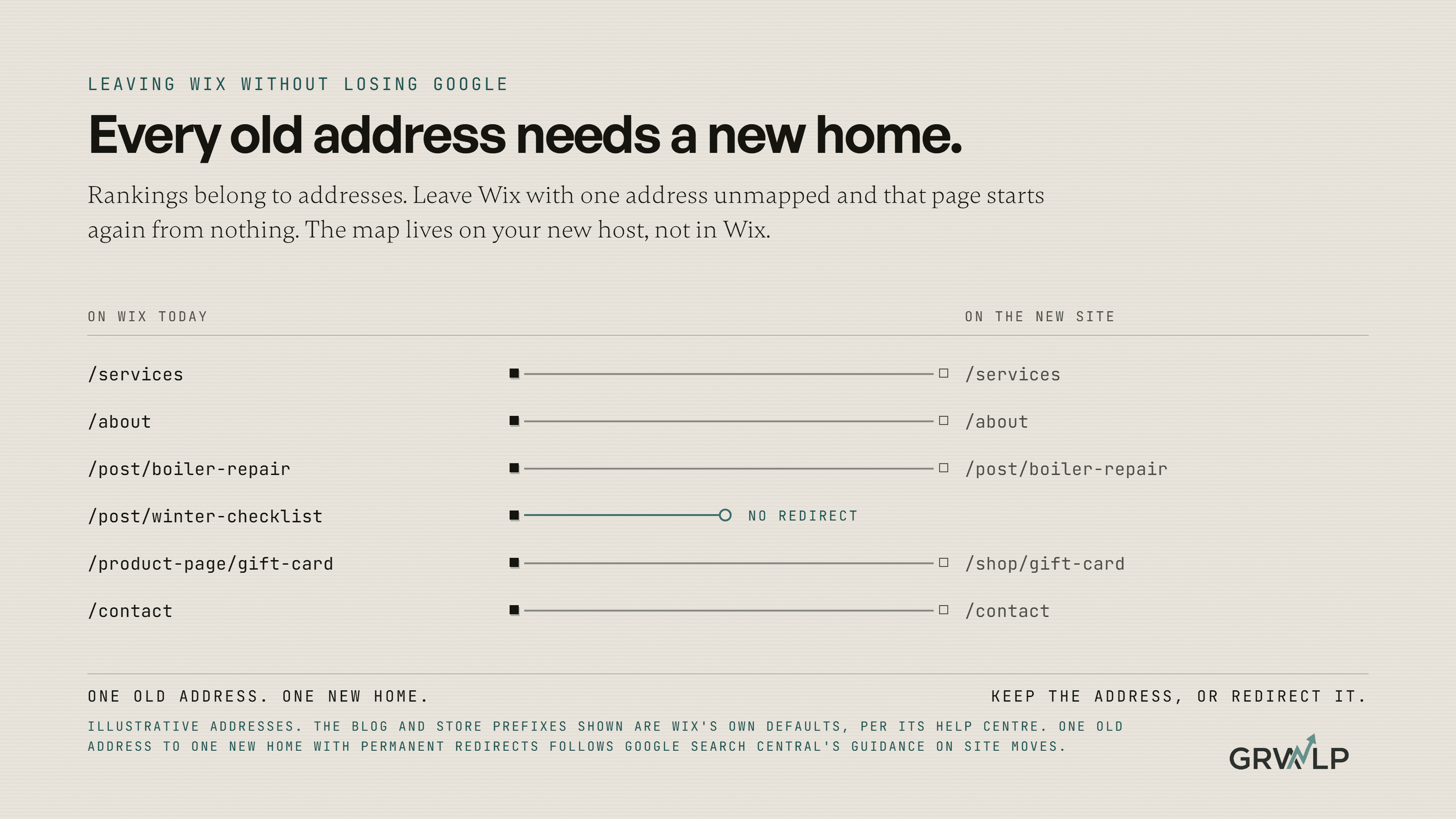
Your new site does not have to look like Wix, but its addresses can. If your services page lives at /services today, build it at /services tomorrow. If your blog posts live under /post/, the new site can serve them under /post/ too. It is a little untidy and it does not matter. An address that has not changed needs no redirect and loses nothing.
Where you genuinely want a new address, write it in the second column of the spreadsheet beside the old one. One old address, one new home. Never send a batch of old pages to the homepage because it is easier. A visitor who clicked on a page about boiler repairs and lands on a generic homepage leaves, and Google reads it the same way.
Common Wix addresses and what to do with each on the new site
| On Wix today | What it is | Best option |
|---|---|---|
| /services, /about, /contactRedirect to the matching new page | Your main pages | Keep the same address |
| /post/your-post-titleRedirect each post to its new address | A blog post | Keep /post/ on the new site |
| /product-page/product-nameRedirect each product, never to the shop homepage | A store product | Keep the same path |
| Redirects already set up in WixRebuild each one on the new host, pointing at the final page | Old addresses you renamed before | Export them from Wix as a CSV file |
| yourname.wixsite.com/siteOnly matters if people linked to it | The free Wix address | Leave it alone |
Step 3: Can I export my Wix site?
Not in the way you would hope. Plan for copying by hand.
Wix says plainly that a Wix site cannot be exported or hosted anywhere else, because it runs on Wix's own technology. Its help centre also says it is not currently possible to export blog posts to other platforms. So the words, the images, the page titles and the meta descriptions come across one page at a time.
That sounds grim, and for a ten page site it is an afternoon. For a site with two hundred blog posts it is the biggest line in the project, and anyone quoting you for the move should say how they intend to do it. Copy the page title and the meta description exactly as they are now. They are part of what the page ranks for, and this is not the month to improve them.
Step 4: Should I improve the content while I move it?
No. Build the new site on a private address with the same words, and rewrite next month.
This is the most tempting mistake in the whole project, and it comes from good intentions. You are rebuilding anyway, so why not fix the tired copy at the same time? Because if rankings dip after launch, you will not know whether the move caused it or the rewrite did, and neither will anyone you hire to find out.
Google's guide warns that rankings can fluctuate for a while during any move and that it can take a few weeks or more for a medium sized site to settle. Give it that time with only one thing changed. Then change the words, one important page at a time, and watch each one.
Build and test the new site somewhere private first. Click every page. Fill in every form. Your customers should never be the ones who discover the broken booking button.
Step 5: Where do the redirects go when I leave Wix?
On the new host. This is the step Wix specific moves get wrong most often, and it is worth understanding why.
A redirect is a note left at an old address saying "this page has moved, here is where it went". Google wants those notes to be permanent, server side redirects, the kind called a 301 or 308, and says a permanent redirect does not cost the page its ranking.
Wix has a tool for this, the URL Redirect Manager, and plenty of guides point you to it. But Wix's own help page says it needs a Premium plan and a connected domain, because Wix is the one answering visitors at your address. The moment your domain points at your new host, Wix is no longer answering anybody. Every redirect you set up inside Wix stops existing, as far as your visitors are concerned, on the same day.
So the redirect map from step two gets built on the new host, in whatever the new platform uses for redirects, and it gets tested before the domain moves. Point each old address straight at its final new home, with no chains of one redirect pointing at another. Google says to keep redirects in place for at least a year. Keep them longer. They cost nothing.
Step 6: How do I move my domain without breaking my email?
Carefully, and with a copy of every setting written down first.
If you bought your domain through Wix, you have two choices. You can leave it registered at Wix and simply point it at the new site, which Wix explains in connecting a Wix domain to an external site. Or you can move the domain to another registrar, which Wix says usually takes up to seven days. Pointing is quicker and can be undone. Transferring can wait until the new site has settled.
Then the part that catches people. If your business email runs on your domain, through Google Workspace or Microsoft 365 or anything else, the domain's settings hold the records that tell the world where your email goes. Before you change a single setting, screenshot or copy every record that exists today. Move the website records. Leave the email records exactly as they were. A website that is down for an hour is annoying. An inbox that silently stops receiving enquiries is the thing this whole move was meant to prevent.
One piece of good news. If your domain name stays the same, Google's Change of Address tool is not for you. It exists for moves from one domain to another. Keeping the same domain means there is nothing to tell Google beyond the redirects and the sitemap.
Step 7: What do I check after the move?
For four weeks, check three things every few days.
Take the old addresses from your spreadsheet and visit a sample of them, including the ones that bring you the most enquiries. Each should land on its new home in one hop. Submit the new site's sitemap in Search Console, which Google says helps it discover the new addresses faster. Then watch the Performance report and the Pages report for errors and for the pages you care about most.
A dip in the first weeks is normal, and Google says so. A page that has vanished from search entirely after a month is not normal, and it is almost always a missing or broken redirect. Go back to the spreadsheet, find the old address, fix it.
How do I know the new site is actually faster?
Measure the same page before and after, on the same tool, on mobile.
Before the move, run your busiest page through Google PageSpeed Insights and save the mobile result. Run the same page again after. That comparison, not the new developer's sales page and not ours, is your answer. We printed our own site's slower real world numbers next to our faster laboratory claim in should I use Wix or hire a developer, for exactly this reason. Speed is one of the reasons to leave, and it is one you can prove to yourself for free.
What happened when one business left Wix?
The honest version is that it was the easy case, and that is the useful part.
VIP Creative Studio is a fractional marketing agency working with credit unions across the United States. Its whole web presence was a single Wix landing page, with no service breakdown, no case studies, no blog and no contact form. Prospects could only reach the team by email.
So the migration risk was close to zero. There was one address with a little history and nothing else to protect. The real work was building what had never existed: thirteen pages across five service lines on Next.js, with more than a hundred fields the team could edit themselves from a visual editor, and a written guide so nobody needed a developer to publish a case study. The full story is in the VIP Creative Studio case study.
That is the lesson worth taking from it. How careful a move has to be depends on how much the old pages have earned. A one page site can move on a Tuesday. A site with three years of blog posts ranking for the questions your customers ask needs every step on this page, in order.
Can I do this myself, and what does it cost?
A small site, yes, if you are patient with a spreadsheet. A large one, probably not alone.
The steps above are the whole method. Nothing in them needs a developer except building the new site and setting up the redirects on it, and plenty of modern platforms give you a redirect screen. The risk is not difficulty. It is the one address you forgot.
If you hire someone, what we charge for a website build, from $2,000 to $10,000 and up with a rebuild shipping in six to ten weeks, is published on our web development page, and what moves that number is in how much a small business website costs in 2026. If you are not sure the move is worth making at all, the Growth Audit looks at the whole picture first, or you can talk it through on a free call.
Whoever you hire, ask them one question before you sign: "Show me the redirect map, and tell me where it will live." If they answer with a spreadsheet and the name of the new host, you are in good hands. If they answer with the Wix dashboard, keep looking.
“Wix's redirect manager only works while Wix is serving your domain. The day you leave, your redirects have to live somewhere else.”
Written by Oyekola Obajuwon