A website with a quote form and WhatsApp follow-up for a service business: what to build
The exact pages and pieces to build so a quote request and its WhatsApp follow-up land in one system, not three.
TL;DR
Build five pieces: a quote request page, a confirmation step, WhatsApp connected to one customer record, an automatic reminder for quotes that go quiet, and one system that holds it all. Build them in that order and test each before the next. The price is quoted per request once the workflow is scoped, usually one to four weeks.
Last updated 26 September 2026. Written by Oyekola Obajuwon, founder of Growveloper, who builds the website, the marketing and the follow up for owner run businesses in Nigeria, the United States and the United Kingdom.
Build five pieces: a quote request page, a confirmation step, WhatsApp connected to one customer record, an automatic reminder for quotes that go quiet, and one system that holds it all. Build them in that order and test each before the next. The price is quoted per request once the workflow is scoped, usually one to four weeks.
Most pages that promise this build are selling one piece of it. A form builder sells you the quote request page. A WhatsApp automation platform sells you the reminders. Neither one tells you what the other four pieces are, or what order to build them in, before you have paid for any of it.
What does a quote form and WhatsApp follow-up system actually include?
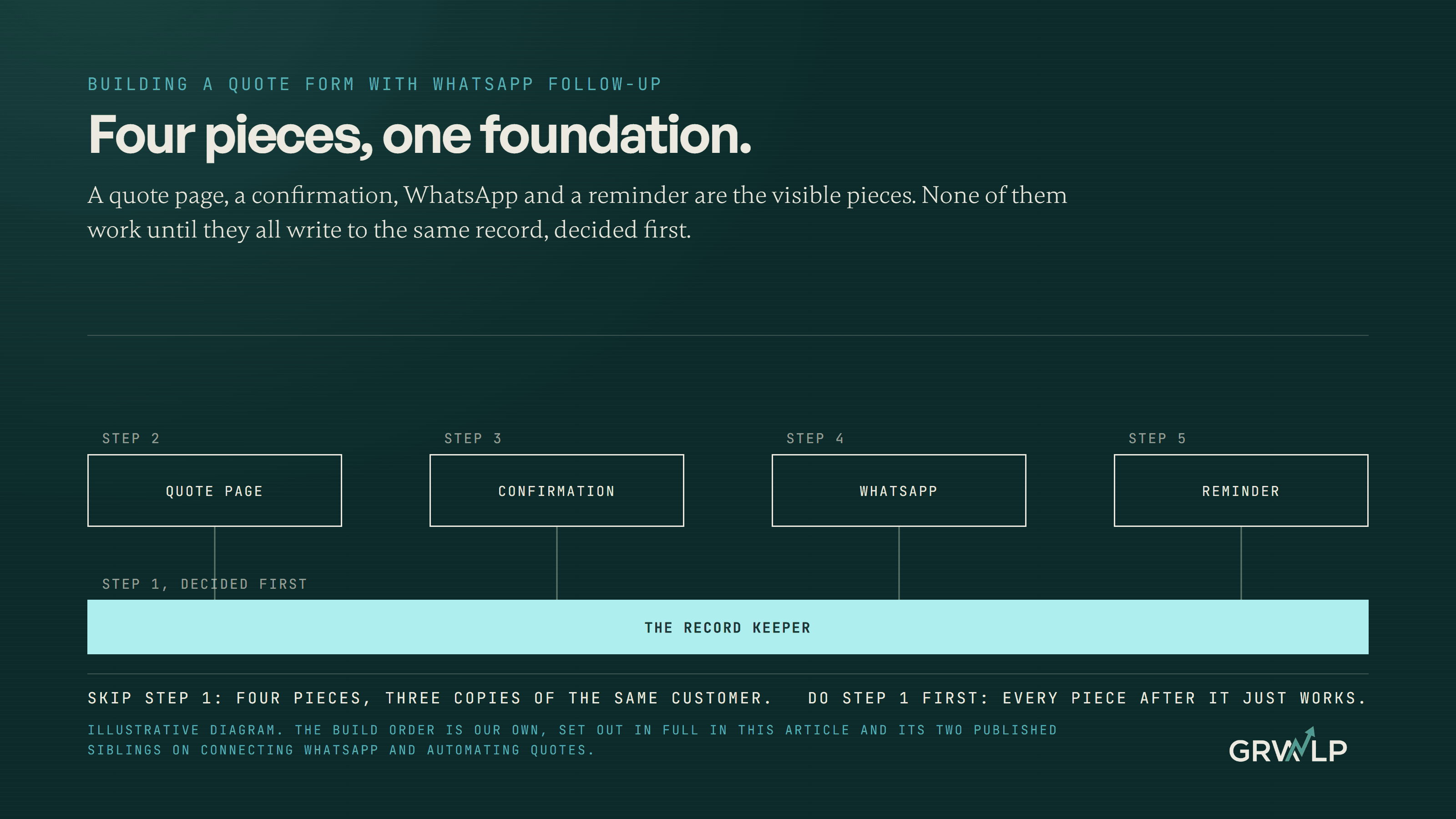
Five pieces, and the reason the order matters is that each piece only earns its keep once the piece before it exists. A reminder is worthless without a request to remind someone about. WhatsApp automation is worthless if the message it sends has nowhere to write the answer down.
The five pieces: the quote request page, the confirmation step after someone submits it, WhatsApp joined to one customer record rather than a chat nobody else can see, an automatic reminder when a quote goes quiet, and the one system, usually a CRM or booking tool, that every other piece writes to.
What goes on the quote request page?
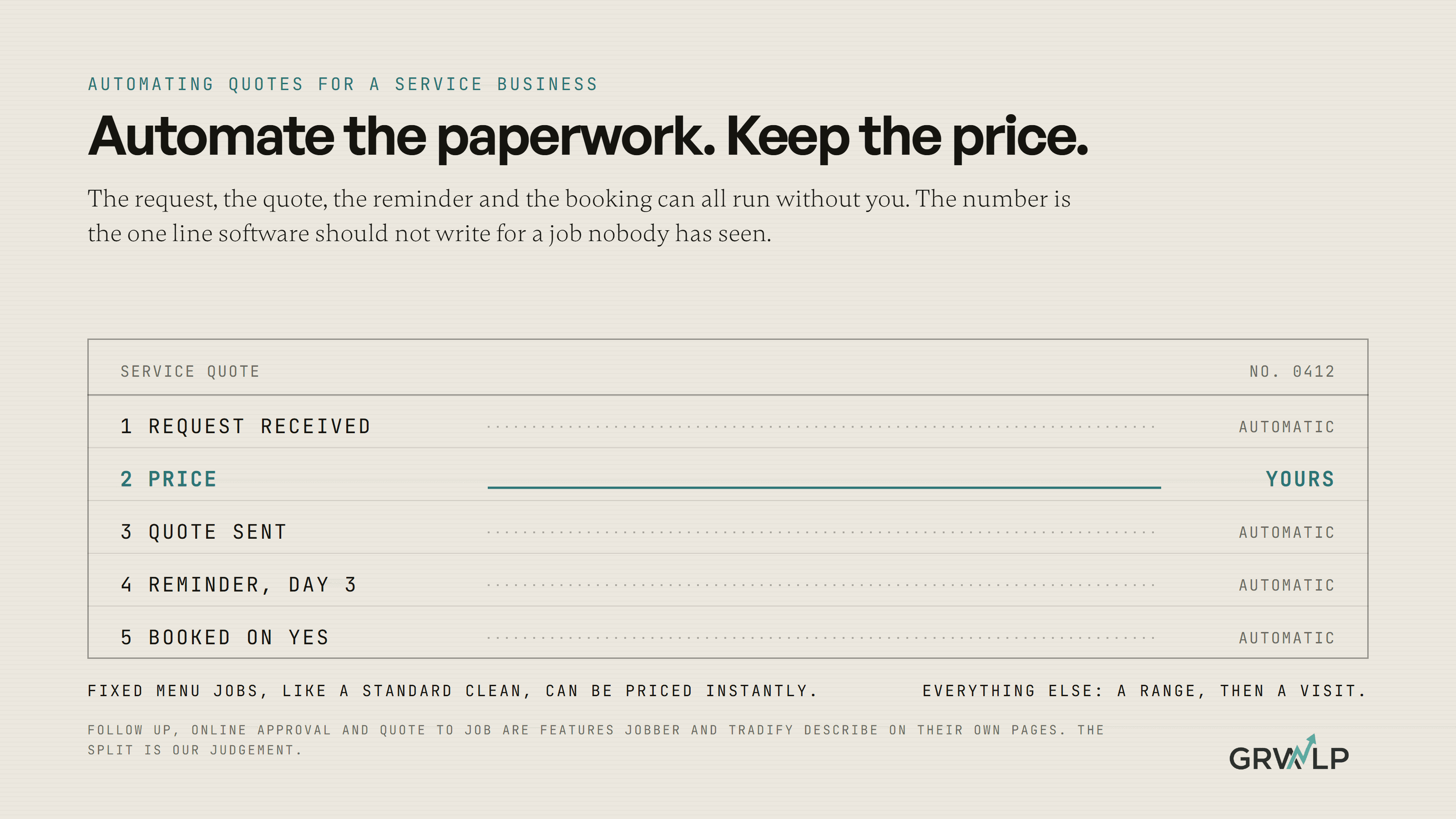
This is the page a customer lands on from a search result, a WhatsApp message, or an ad, and it should ask for exactly what you need to give a real answer: their name and the number they want a reply on, the address or postcode of the job, what they need in their own words, a photo where one would save you a visit, and when they need it done. How to automate quotes for your service business sets out the full field list and why every extra question loses someone before they submit.
What happens right after someone submits the form?
The moment someone submits the form, they need to see or hear something back, or they assume it went nowhere and message a competitor instead. The simplest version is a thank you page that states when you reply by. The better version sends an instant WhatsApp or SMS message the second the form lands, the same instant-notification idea behind how to automate lead follow-up for your small business, which is the piece that turns a form into a system rather than a mailbox nobody watches.
How does WhatsApp fit into the system?
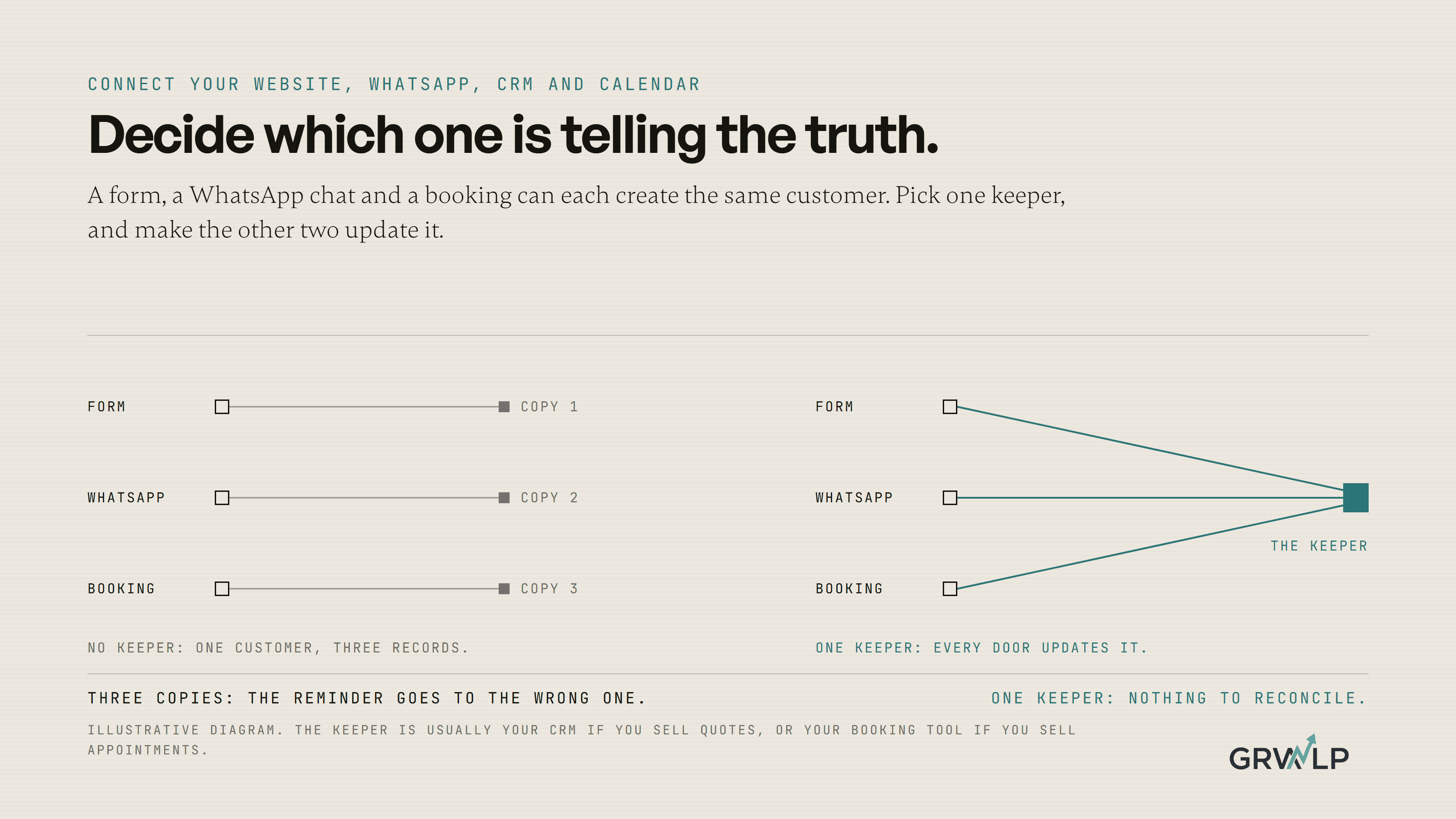
This is where most builds quietly fail, because WhatsApp on its own is a chat, not a record. How do I connect my website to WhatsApp, my CRM and my calendar sets out the fork that decides everything after it: the free WhatsApp Business app can carry a conversation but cannot write to anything else, while Meta's WhatsApp Business Platform can, provided the business has a business portfolio, a WhatsApp Business Account and a business phone number, which Meta's own documentation states plainly. The free app and a click to chat link, which opens a WhatsApp conversation with your number from your website at no cost, are enough if you are happy to reply by hand. Automatic replies and reminders need the Platform.
How do I stop a quote from going quiet?
Most quotes that die, die from silence, not from a no. Quoting software such as Jobber can automatically follow up on quotes that have gone quiet, cutting the no-shows and forgetfulness that cost you jobs, and the same page describes turning an approved quote into a job with one click, carrying over the line items, pricing and customer details rather than retyping them. Without software, a calendar reminder three days after every quote does most of the same job for nothing.
Where does everything need to land?
Every piece above only becomes a system once it writes to the same place. Pick a record keeper, your CRM or your booking tool, before you build anything else, so the form, the WhatsApp reply and the reminder all update the same customer instead of three different half-records of them. This is the decision the connecting article above spends its first section on, because skipping it is the single most common reason a build like this stops working within a month.
What order should I build this in?
Six steps, and testing between each one catches the mistake before a real customer does.
1. Decide the record keeper
Write down which system, usually the CRM or the booking tool, is where a customer's information actually lives.
2. Build the quote request page
Point every field at the record keeper, so a submission creates or updates a customer there rather than only sending you an email.
3. Add the confirmation step
A thank you page at minimum, an instant WhatsApp or SMS acknowledgement at best.
4. Connect WhatsApp
Start with a click to chat link, which costs nothing, and move to the Business Platform once you need a form submission to trigger a WhatsApp reply automatically.
5. Turn on the reminder
Set it to fire when a quote has had no reply for a few days, whether that is a feature in your quoting software or a calendar alert you set by hand.
6. Send yourself a test quote
Fill in the form as a stranger would, and watch whether the confirmation, the WhatsApp message and the reminder all arrive and all land on the same customer record. Fix whichever one does not before you tell a real customer the system works.
What does this cost, and how long does it take?
There is no honest flat number, because the answer depends on how many of these five pieces you already have. Our AI and automation page publishes how we scope a build like this: a single workflow usually takes one to four weeks, and the price is quoted as one fixed number once the pieces and the rules connecting them are known, not sold as a subscription per seat. Anyone who quotes you before asking which pieces you already have is guessing.
The five pieces of the build, in order, and what each one does
| Piece | What it does | Runs on its own once built |
|---|---|---|
| Quote request pageautomate-quotes-service-business | Collects what you need to answer | No, someone still has to read it |
| Confirmation stepThis article | Tells the customer you got it | Yes |
| WhatsApp connected to one recordconnect-website-whatsapp-crm-calendar | Carries the conversation, writes to the record | Only on the Business Platform |
| Reminder for a quiet quoteautomate-quotes-service-business | Chases the silence | Yes |
| The record keeperconnect-website-whatsapp-crm-calendar | Holds one true copy of the customer | Yes, once chosen |
Do I need all five pieces before this is worth building?
No. Build the record keeper decision and the quote request page first, because they carry the most value on their own: everyone with an offer needs somewhere real to send it. The confirmation, the WhatsApp connection and the reminder each add a smaller amount, and any of the three can wait a month without breaking what came before it, because none of them un-does a decision the earlier pieces made.
Who can build this for me?
Building this is part of what our AI and automation work does for local service businesses in Nigeria, the United States and the United Kingdom, and there is a free call if you want to talk through which of the five pieces you already have. We have not published a single client result for this exact five piece build, because every client's starting point is different, so we are not going to hand you a number that belongs to somebody else's business. What we can tell you is the order, and the order is where most builds like this go wrong.
“A quote form and a WhatsApp button are not a system until they write to the same place.”
Written by Oyekola Obajuwon