Zapier or a custom integration: which should a small business use?
Stay on Zapier while a failure costs you a minute. Go custom when the workflow is part of what your customers touch.
TL;DR
Use Zapier while each job is a straight line between apps you already pay for and a failure costs you a minute, not a customer. Move to a custom integration when the workflow has become part of what you sell: several kinds of user, rules that change by who is asking, and mistakes your customers see.
Last updated 24 September 2026. Written by Oyekola Obajuwon, founder of Growveloper, who builds the website, the marketing and the follow up for owner run businesses in Nigeria, the United States and the United Kingdom.
Use Zapier while each job is a straight line between apps you already pay for and a failure costs you a minute, not a customer. Move to a custom integration when the workflow has become part of what you sell: several kinds of user, rules that change by who is asking, and mistakes your customers see.
Most small businesses reading this should stay on Zapier. This page is how to tell whether you are one of them, and what to do if you are not.
How do I know which one I need?
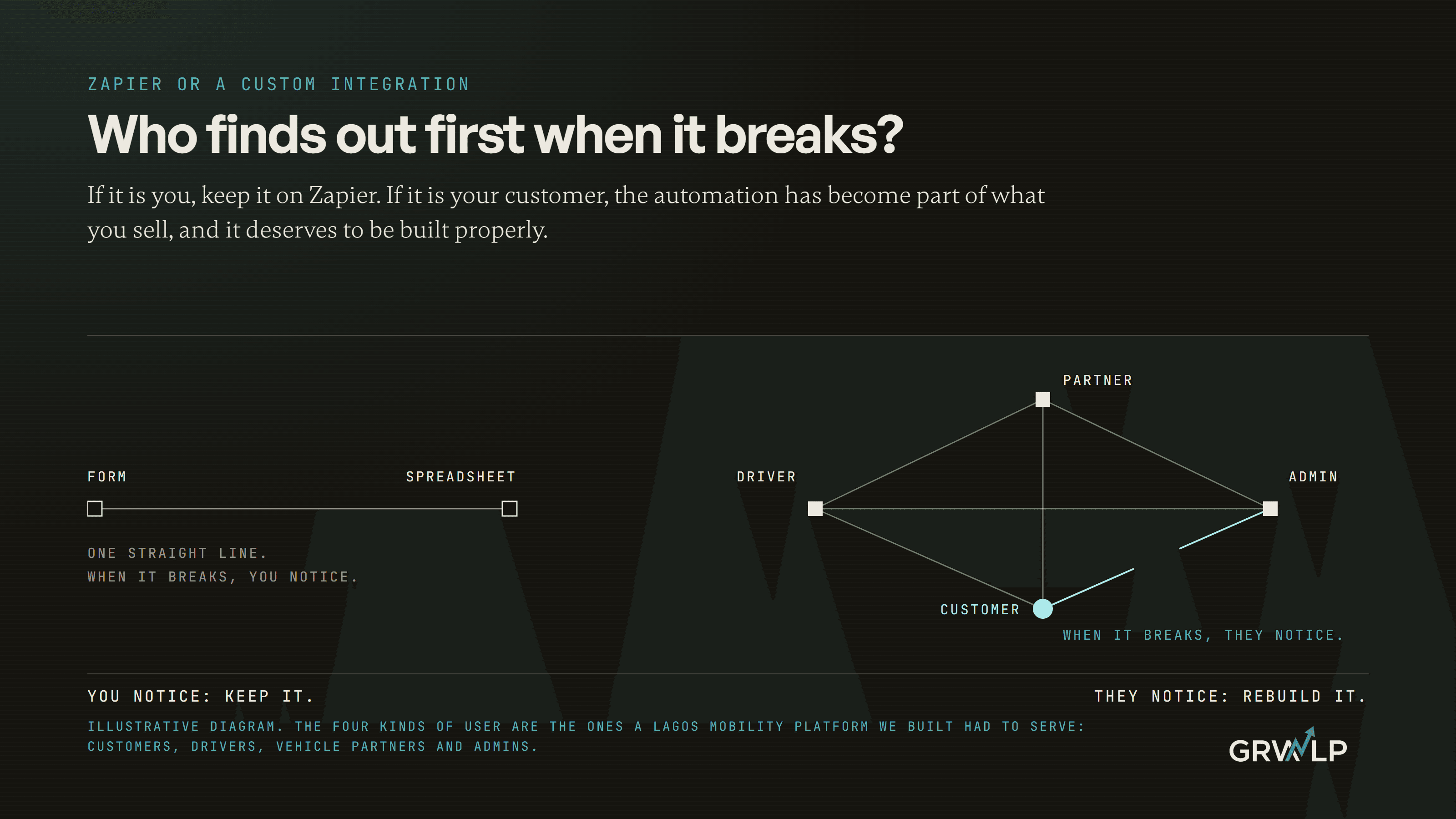
Ask one question about each automation you run: when it breaks, who finds out first?
If the answer is you, because a row did not appear in a spreadsheet or an alert did not reach your phone, that automation is office plumbing. It saves you time, and when it fails you lose some of that time back. Zapier is built for exactly this, and it is very good at it.
If the answer is your customer, because their booking did not confirm, their payment went through but nothing else happened, or they were sent somebody else's quote, then the automation is no longer plumbing. It is part of the service. That is the point where you want something you own, can test properly, and can see inside when it goes wrong.
Price matters, and we will get to it. But price is rarely the real reason to leave. Most people who leave Zapier because of the bill would have been better off tidying it.
What does Zapier actually charge me for?
Tasks, and fewer things count as a task than most owners think.
Zapier's help centre explains how task usage is measured: a task is used when a step successfully does something in another app, such as creating a contact or sending an email. The trigger that starts a zap never uses a task. Neither do Zapier's own built in tools, including filters, paths and the formatter. A step that fails does not count either.
That has one practical consequence worth more than any pricing comparison. If your zap fires on every form submission, including spam, put a filter as the first step. The junk stops there, before it reaches a step that costs anything.
When you run past your plan's limit, Zapier bills the extra tasks separately rather than stopping your zaps, and its page on pay per task billing says that overage is capped at three times the plan's limit. The current prices are on Zapier's pricing page. We do not print them here because they change, and a price in an article is out of date the week after it is written.
One note for owners in Lagos. Zapier bills in US dollars, so a month when your task count jumps is also an exchange rate question. It is one more reason to know which of your zaps are doing the spending.
When is Zapier the right answer?
More often than people who build custom software will usually admit, and we build custom software.
Zapier is right when the job has one clear start and one clear finish. A form is submitted, so a row goes into a sheet and a message goes to your phone. An invoice is paid, so the customer gets a thank you and your bookkeeping tool gets a record. A review arrives, so it lands in a team chat. Each of those is a straight line between two or three apps you already use, and each can be built in an afternoon by somebody who has never written code.
It is also right when you are still working out what the process should be. Building something custom around a process that will change next month is paying to set a guess in concrete. Run it on Zapier for a season, watch where it breaks, then decide.
If you have not yet worked out which job to automate first, that is its own decision, and we set out a way to score it in what a small business should automate first. For the most common first job of all, answering a new enquiry quickly, the step by step build is in how to automate lead follow up, and Zapier handles most of it well.
What are the signs I have outgrown Zapier?
Four, and you need at least two of them before a rebuild is worth its cost.
The bill grows every time the business does
If your task count rises in step with your leads, bookings or orders, you are paying a toll on your own success. On its own that is fine; it is what the tool is for. It becomes a sign when the same few steps are running thousands of times a month and a one off build would cost less than a year of those tasks.
Nobody remembers why a zap exists
Open your zap list. If there are paths inside paths, zaps that trigger other zaps, and at least one named something like "new test 2 FINAL" that nobody dares switch off, the automation has become a system without anyone having designed it. A system nobody understands is a system nobody can safely change.
A customer sees the failure
This is the sign that outranks the others. The first time a customer tells you about a broken confirmation before your own alert does, the automation has crossed from plumbing into service. Services need testing before changes go live, a record of every run you can read, and somebody whose job it is to fix them.
The rules depend on who is asking
A zap is good at "when this happens, do that". It gets awkward when the answer is "it depends": a returning customer gets one reply, a new one another, a trade account a third, and the admin sees all three with different buttons. When the rules are really the way your business works, they belong in software you own, not scattered across branches in somebody else's.
Is there a step between Zapier and custom code?
Yes, and it is the step most owners skip.
Make builds the same kind of workflow on a visual canvas that handles branching and loops more comfortably than a list of steps. Its help centre explains that it now bills in credits, with most module runs using one credit each and some advanced AI features using more. For a workflow that has grown a lot of branches, it is often the tidier home.
n8n goes further. Its community edition can be hosted on your own server for free, with almost the whole feature set and no charge per run. That sounds like the end of the bill, and it partly is. What you have really done is swap a monthly invoice for a server that somebody has to keep running, update and watch. For a business with a technical person, or a partner who looks after it, that is a very good trade. For a business without one, it is a new way for things to break on a Saturday.
Four ways to connect your apps, for an owner already on Zapier
| Option | How you pay | Who builds it | Who fixes it when it breaks |
|---|---|---|---|
| ZapierStraight lines between apps you already use | Per task, by monthly plan | You, no code | You, from the task history |
| MakeThe zap has grown branches and loops | Per credit, most steps one credit | You or a freelancer | Whoever built it |
| n8n, self hostedHigh volume and someone to look after it | Free software, plus the server | Someone technical | Whoever runs the server |
| Custom integrationCustomers touch it, or the rules are your business | A one off build, then upkeep | A developer | The developer or the team they hand over to |
What does a custom integration actually look like?
Here is one where the choice was never close.
RideOn Nigeria is a premium chauffeur and car rental service in Lagos, with an owner running it from Canada. Before the rebuild, customers booked on WhatsApp, drivers signed up through a form on a static website, the partners who supplied vehicles had no portal at all, and the admin team ran everything from spreadsheets and chat threads.
You could have held that together with zaps for a while. A form to a sheet, a sheet to a message. But the business had four kinds of user, customers, drivers, vehicle partners and admins, and each needed to see and do different things with the same booking. The rules about who could do what were not a side detail. They were the business.
So it was built as one platform with four portals: booking history and status tracking for customers, availability and earnings for drivers, fleet management for partners, and full oversight for the admin team. Six scheduled jobs ran in production behind it, identity checks for drivers went through Dojah, and payments were built in. The owner could run the whole operation from Canada through one dashboard. The RideOn Nigeria case study tells the full story.
The lesson is not that custom is better. It is that when every automation you would write touches a customer and depends on who they are, you are not connecting apps any more. You are building the product.
What does a custom integration really cost to run?
More than the build price, and the part nobody quotes you is upkeep.
The apps on either end of any integration change. They rename fields, retire old versions of their connections, and change their rules. A zap mostly absorbs that for you, because Zapier maintains the connections. A custom integration does not. Somebody has to notice, and somebody has to fix it.
So when you get a quote, ask for two numbers: what it costs to build, and what it costs each month to keep working. Our own AI and automation page publishes how we answer that: a single workflow takes one to four weeks to build, every one ships with error logging, failure alerts and a monitoring dashboard, and without a retainer you keep the documentation and the access so any developer can pick it up. Whoever you hire, those are fair things to expect in writing.
We should be plain about our interest. We sell custom builds. That is why this page spends a whole section telling you when not to buy one.
Can I start on Zapier and move later?
Yes, and it is usually the smart order.
A season on Zapier is the cheapest way to learn what your process really is. Every failed run in the task history is a note about where the real rules live. When you do move, that history becomes the specification: these are the triggers, these are the branches, these are the three places it kept breaking.
The only thing to avoid is letting the zaps become the only record of how your business works. Keep a one page note for each important zap, in plain words, saying what starts it, what it does and who should be told if it stops. That note makes a later move a week of work rather than a month of archaeology, and it is the same map we describe in why nothing connects without an integration layer.
How do I decide this week?
Open your Zapier task history and sort every zap into one of three piles.
Keep: it works, you are the one who notices if it fails, and its task count is small. Tidy: it works, but it runs on junk it should filter out, or it has grown branches nobody can explain. Move those to a filter first, or into Make. Replace: a customer sees it when it breaks, or its rules are really the way your business works. Those are the ones worth a proper conversation, with us on a free call or with anyone you trust.
Most owners end up with a long keep pile, a short tidy pile and one or two in replace. That is a good result. It means the tool is doing its job and you know exactly where it stops.
And if you are ever unsure which pile a zap belongs in, go back to the first question. When it breaks, who finds out first? If it is a customer, you already know.
“The question is not what the automation costs. It is who finds out first when it breaks, you or your customer.”
Written by Oyekola Obajuwon