How do I automate invoice reminders for my small business?
The schedule, the words, the tools that already do it, and the one rule that stops an automatic reminder chasing a customer who has paid.
TL;DR
Turn on the reminders already inside your invoicing tool, set one before the due date and two or three after, and make sure each one stops the moment the invoice is marked paid. Keep the words plain, put the pay link in every message, and hand the last step to a person who picks up the phone.
Last updated 19 October 2026. Written by Oyekola Obajuwon, founder of Growveloper, a growth studio that builds the website, the marketing and the follow up for owner run businesses in the United States, the United Kingdom and Nigeria.
Turn on the reminders already inside your invoicing tool, set one before the due date and two or three after, and make sure each one stops the moment the invoice is marked paid. Keep the words plain, put the pay link in every message, and hand the last step to a person who picks up the phone.
That is most of the job, and it takes an afternoon. The rest of this page is the schedule, the words for each message, which tool does it where you invoice, and the one rule that decides whether automatic reminders help you or embarrass you.
Why automate invoice reminders at all?
Because the chase is the job everyone puts off, and an invoice nobody chases is an invoice that waits.
Intuit's QuickBooks late payments report, from a January 2025 survey of 2,487 US small businesses, found 56% were owed money on unpaid invoices, about $17,500 each on average. In the UK, FreeAgent's analysis of its customers' invoices found 49.3% of invoices sent by small businesses between June 2023 and June 2024 were paid late. Different measures, same picture: about half.
A late invoice is rarely a customer refusing to pay. It is usually an email under forty others. A reminder that arrives on time, every time, without you remembering to send it, fixes most of that. It is the job at the top of our list of what a small business should automate first: it happens every billing cycle and needs no judgement at all.
When should invoice reminders go out?
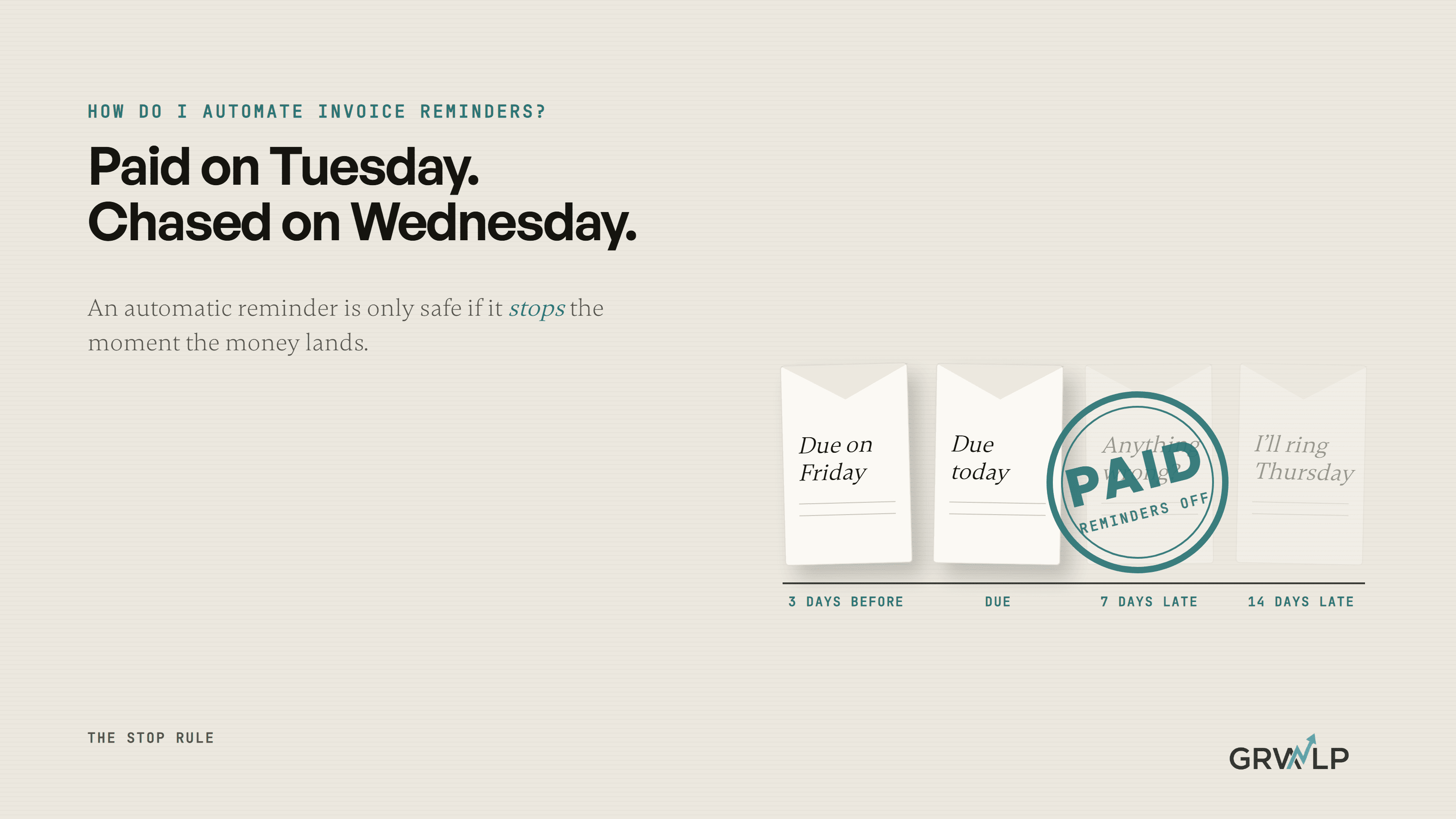
One before the due date, one on it, two after, then a person.
An invoice reminder schedule for a small service business
| When | What the message does | Who sends it |
|---|---|---|
| 3 days before due | A friendly heads up with the pay link | The tool |
| On the due date | Says it is due today, with the link | The tool |
| 7 days late | Asks if anything is wrong, with the link | The tool |
| 14 days late | Names the next step plainly | The tool |
| 21 days late | A phone call or a voice note | You |
The one before the due date does the most work and feels the least like chasing, because nothing is late yet. The one at 7 days is a question, not a demand, since a quiet invoice is often a wrong email address or a query nobody raised. By 21 days a sixth email will not do what one call does, which is why the last row is you.
If your terms are not written on the invoice, write them. In the UK, the law says that with no agreed date a business payment is late 30 days after the customer gets the invoice or you deliver, whichever is later. Set your own date and the clock starts when you say.
What should each reminder say?
Less than you think. The amount, the invoice number, the date, the link, and one human sentence.
Before the due date
Hi Ade, a quick heads up that invoice 1042 for the kitchen deep clean is due on Friday. You can pay here: [link]. Thanks again for having us.
On the day
Hi Ade, invoice 1042 is due today. Here is the link if it is easier than a transfer: [link].
A week late
Hi Ade, invoice 1042 is now a week past due. Has anything gone wrong with it, or has it just got buried? The link is here: [link]. If you have already paid, ignore this and thank you.
Two weeks late
Hi Ade, invoice 1042 is two weeks past due. I will give you a ring on Thursday to sort it out. If you would rather settle before then, the link is here: [link].
Notice what is missing: no capitals, no final notice, no as per my last email. The customer who reads these is usually someone you want to work with again. The last line of the week late message matters most of all, and the next section is why.
What is the stop rule?
An automatic reminder is only safe if it stops itself the moment the money lands. We call this the stop rule, and it is the part most setups get wrong.
Here is how it breaks. A customer pays by bank transfer on Tuesday. You match that payment to the invoice on Friday, when you sit down with the books. On Wednesday the tool, which still thinks the invoice is open, sends a polite email accusing a good customer of owing you money. Xero's invoicing page says "As soon as payment arrives, Xero stops sending." That is true from Xero's side. But the payment has arrived only when the invoice is marked paid, and that happens when someone, or a bank feed, matches it.
So the stop rule has three parts:
- Payments taken through the invoice's own pay link mark it paid automatically. Push every customer you can towards that link.
- Bank transfers get matched daily, not weekly, while reminders are switched on. If you cannot do that, turn off the reminder for the day after the due date and start at 7 days.
- Any customer who has raised a query or a dispute gets reminders switched off for that invoice until it is settled.
The tool is very good at counting days and very bad at knowing what happened at the bank. The stop rule is how you close that gap.
Which tool should send the reminders?
The one that already holds the invoice. Do not build anything until you have checked.
QuickBooks
QuickBooks Online has automatic reminders under the Sales settings. Its own help page lets you set a first reminder and add a second and third, scheduled up to 90 days before or after the due date. Reminders only go to invoices you have already emailed from QuickBooks, so an invoice you sent as a PDF from your own email will never be chased.
Xero
Xero sets reminders before and after the due date with your own words, and stops when the invoice is paid. The same catch applies: only invoices Xero knows were sent, and only payments Xero has matched.
Paystack, and invoices sent on WhatsApp in Nigeria
Paystack Invoices send a request by email with a pay link, notify you when it is paid, and let you send a reminder from the dashboard or the app. Its support page describes reminders you send yourself, not a schedule. For a Lagos business that bills on WhatsApp, the honest setup is a small automation that checks each morning which requests are still open and sends the right message from the table above, on WhatsApp Business. Our guide to WhatsApp automation in Lagos covers what that costs and what WhatsApp allows.
A separate tool
Only if your invoices live in three places, or the reminder has to come from your CRM with the job history attached. That is a connection job, the kind on our AI and automation page, and it is worth it only when the built in reminders genuinely cannot see the invoice.
Should AI write my invoice reminders?
No. Write them once and let a plain rule send them.
A reminder is the same four messages, fired on the same days, with the same facts filled in. That is a rule, not a judgement, and rules do not invent a figure or change their tone on a Tuesday. Our guide to which repetitive jobs AI can actually do puts booking reminders and invoice chasers in the not an AI job row for that reason. Where AI can help is the reply: when a customer answers a reminder with a question, it can draft your answer for you to check and send.
When we built the platform for RideOn Nigeria, a chauffeur service in Lagos, the same thinking ran its emails. A message that failed to send was tried again after 5 minutes, then 30, then 2 hours, and then it stopped, because the rule had a cap on attempts. Nobody had to remember to retry, and nothing retried forever. That is the whole shape of a good reminder schedule: a fixed ladder, a cap, and a person when the ladder runs out.
What happens after the last reminder?
A person takes over, and in the UK the law gives that person something to say.
Call, or send a voice note if that is how you talk to this customer. Most invoices that survive four reminders have a reason behind them, a query, a cash problem, a wrong contact, and a conversation finds it faster than a fifth email.
In the UK, a business that pays another business late owes statutory interest of 8% plus the Bank of England base rate, unless your contract sets a different rate, plus a fixed recovery sum of £40 on a debt under £1,000, £70 up to £10,000, and £100 above that. Saying so in the 14 day reminder, calmly, often settles it. In the US and Nigeria, put your late fee in your terms before the work starts; a fee that was never agreed is a fee you will not collect.
If quotes go quiet before they ever become invoices, that is a different chase, covered in our guide to automating quotes for a service business. And if you want the reminders, the bank matching and the WhatsApp messages wired together for you, book a free 30 minute call. The reminder nobody enjoys sending becomes the one nobody has to remember.
Automate the stopping first. The sending is the easy part.
“The email is the easy part. The hard part is the word paid, and whether your tool hears it in time.”
Written by Oyekola Obajuwon
invoice reminders · payment reminders · late payments · small business automation · accounts receivable · QuickBooks · Xero · Paystack